问题
我在ubuntu22.04的容器里面运行apt update的时候出现了以下报错
 1
 2
 3
 4
 5
 6
 7
 8
 9
10
11
12
13
14
15
16
17
18
19
20
21
22
23
24
25
26
27
28
29
30
31
32
33
34
35
36
37
38
39
40
41
|
[root@VM-16-9-centos docker-kubuntu]# docker run --rm -it ubuntu:22.04 bash
root@8ac245b487e6:/# apt update
Get:1 http://security.ubuntu.com/ubuntu jammy-security InRelease [110 kB]
Get:2 http://archive.ubuntu.com/ubuntu jammy InRelease [270 kB]
Err:1 http://security.ubuntu.com/ubuntu jammy-security InRelease
  The following signatures couldn't be verified because the public key is not available: NO_PUBKEY 871920D1991BC93C
Err:2 http://archive.ubuntu.com/ubuntu jammy InRelease
  The following signatures couldn't be verified because the public key is not available: NO_PUBKEY 871920D1991BC93C
Get:3 http://archive.ubuntu.com/ubuntu jammy-updates InRelease [109 kB]
Err:3 http://archive.ubuntu.com/ubuntu jammy-updates InRelease
  The following signatures couldn't be verified because the public key is not available: NO_PUBKEY 871920D1991BC93C
Get:4 http://archive.ubuntu.com/ubuntu jammy-backports InRelease [90.7 kB]
Err:4 http://archive.ubuntu.com/ubuntu jammy-backports InRelease
  The following signatures couldn't be verified because the public key is not available: NO_PUBKEY 871920D1991BC93C
Reading package lists... Done
W: http://security.ubuntu.com/ubuntu/dists/jammy-security/InRelease: The key(s) in the keyring /etc/apt/trusted.gpg.d/ubuntu-keyring-2012-cdimage.gpg are ignored as the file is not readable by user '_apt' executing apt-key.
W: http://security.ubuntu.com/ubuntu/dists/jammy-security/InRelease: The key(s) in the keyring /etc/apt/trusted.gpg.d/ubuntu-keyring-2018-archive.gpg are ignored as the file is not readable by user '_apt' executing apt-key.
W: GPG error: http://security.ubuntu.com/ubuntu jammy-security InRelease: The following signatures couldn't be verified because the public key is not available: NO_PUBKEY 871920D1991BC93C
E: The repository 'http://security.ubuntu.com/ubuntu jammy-security InRelease' is not signed.
N: Updating from such a repository can't be done securely, and is therefore disabled by default.
N: See apt-secure(8) manpage for repository creation and user configuration details.
W: http://archive.ubuntu.com/ubuntu/dists/jammy/InRelease: The key(s) in the keyring /etc/apt/trusted.gpg.d/ubuntu-keyring-2012-cdimage.gpg are ignored as the file is not readable by user '_apt' executing apt-key.
W: http://archive.ubuntu.com/ubuntu/dists/jammy/InRelease: The key(s) in the keyring /etc/apt/trusted.gpg.d/ubuntu-keyring-2018-archive.gpg are ignored as the file is not readable by user '_apt' executing apt-key.
W: GPG error: http://archive.ubuntu.com/ubuntu jammy InRelease: The following signatures couldn't be verified because the public key is not available: NO_PUBKEY 871920D1991BC93C
E: The repository 'http://archive.ubuntu.com/ubuntu jammy InRelease' is not signed.
N: Updating from such a repository can't be done securely, and is therefore disabled by default.
N: See apt-secure(8) manpage for repository creation and user configuration details.
W: http://archive.ubuntu.com/ubuntu/dists/jammy-updates/InRelease: The key(s) in the keyring /etc/apt/trusted.gpg.d/ubuntu-keyring-2012-cdimage.gpg are ignored as the file is not readable by user '_apt' executing apt-key.
W: http://archive.ubuntu.com/ubuntu/dists/jammy-updates/InRelease: The key(s) in the keyring /etc/apt/trusted.gpg.d/ubuntu-keyring-2018-archive.gpg are ignored as the file is not readable by user '_apt' executing apt-key.
W: GPG error: http://archive.ubuntu.com/ubuntu jammy-updates InRelease: The following signatures couldn't be verified because the public key is not available: NO_PUBKEY 871920D1991BC93C
E: The repository 'http://archive.ubuntu.com/ubuntu jammy-updates InRelease' is not signed.
N: Updating from such a repository can't be done securely, and is therefore disabled by default.
N: See apt-secure(8) manpage for repository creation and user configuration details.
W: http://archive.ubuntu.com/ubuntu/dists/jammy-backports/InRelease: The key(s) in the keyring /etc/apt/trusted.gpg.d/ubuntu-keyring-2012-cdimage.gpg are ignored as the file is not readable by user '_apt' executing apt-key.
W: http://archive.ubuntu.com/ubuntu/dists/jammy-backports/InRelease: The key(s) in the keyring /etc/apt/trusted.gpg.d/ubuntu-keyring-2018-archive.gpg are ignored as the file is not readable by user '_apt' executing apt-key.
W: GPG error: http://archive.ubuntu.com/ubuntu jammy-backports InRelease: The following signatures couldn't be verified because the public key is not available: NO_PUBKEY 871920D1991BC93C
E: The repository 'http://archive.ubuntu.com/ubuntu jammy-backports InRelease' is not signed.
N: Updating from such a repository can't be done securely, and is therefore disabled by default.
N: See apt-secure(8) manpage for repository creation and user configuration details.
E: Problem executing scripts APT::Update::Post-Invoke 'rm -f /var/cache/apt/archives/*.deb /var/cache/apt/archives/partial/*.deb /var/cache/apt/*.bin || true'
E: Sub-process returned an error code
|
原因
经过查询,发现是ubuntu21.10和fedora35开始使用glibc2.34甚至更高的版本。在glibc2.34版本里面,开始使用一个名为clone3的系统调用。通常情况下,容器里面所有的系统调用都会被docker捕获,然后docker决定如何处理它们。如果docker中没有为特定系统调用指定策略,则默认的策略会通知容器这边"Permission Denied"。但是,如果 Glibc 收到此错误,它不会回退。它仅在收到响应“此系统调用不可用”时才执行此操作。
解决
办法一
运行容器的时候,加上这个参数来绕过docker系统调用限制
1
|
--security-opt seccomp=unconfined
|
不过这会有很大的问题,一个是你的容器将变得不安全,另一个是这些参数在构建镜像的时候是不可用的。所以,请参考办法二
办法二
将docker升级到20.10.8以上的版本(> 20.10.8)
由于生产环境调整docker版本不是一件容易的事情,所以生产环境在构建镜像时候要避免使用ubuntu21.10和fedora35以更高版本的镜像,以及使用它们作为基础镜像的其他镜像。目前官方大部分镜像基于debian,后续要确认debian系列镜像是否受此影响
办法三
升级runc。
https://github.com/opencontainers/runc/releases/
升级前使用docker version查看runc命令
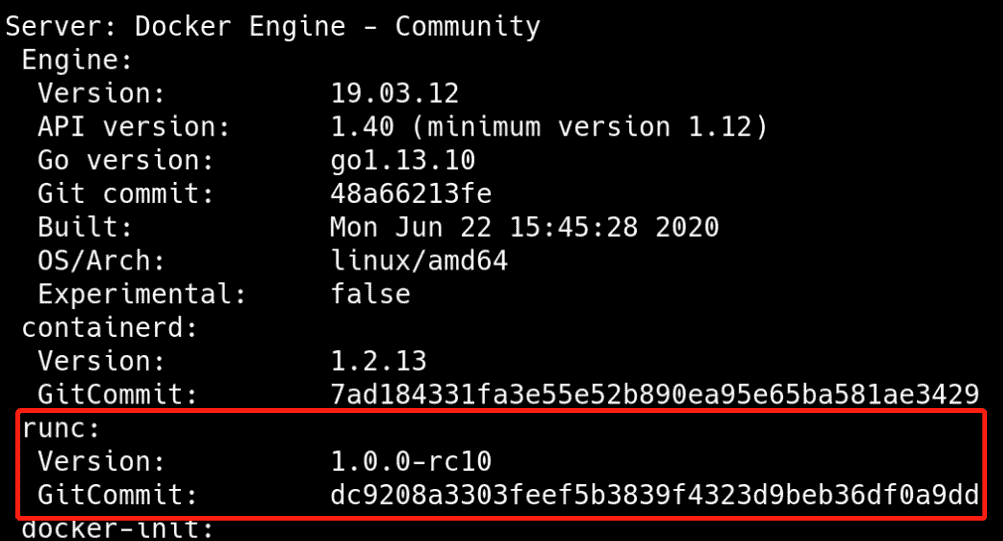
1.选择1.0.0-rc95版本,下载runc.amd64
![img]()
2. 上传服务器,修改名字并赋予权限
1
|
mv runc.amd64 runc && chmod +x runc
|
3.备份原有的runc
4.停止docker
5.替换新版本runc
6. 启动docker
7.检查runc是否升级成功