通过Docker容器化部署OpenVPN客户端实现网络连接,结合iptables防火墙规则建立killswitch机制防止流量泄漏,并通过SOCKS5代理实现与Clash等代理软件的兼容使用。方案包含完整的Docker配置、路由规则配置及代理分流策略。
这篇文章已发布 1328 天,部分内容可能已过时。如有疑问,可在评论区留言。
为了解决 OpenVPN 与 代理软件冲突的问题
wfg/docker-openvpn-client: OpenVPN client with killswitch and proxy servers; built on Alpine (github.com)
构建文件
Dockerfile
 1
 2
 3
 4
 5
 6
 7
 8
 9
10
11
12
13
14
|
FROM alpine:3.17

RUN apk add --no-cache \
    bash \
    bind-tools \
    iptables \
    ip6tables \
    openvpn

COPY . /usr/local/bin

ENV KILL_SWITCH=on

ENTRYPOINT [ "entry.sh" ]
|
killswitch
 1
 2
 3
 4
 5
 6
 7
 8
 9
10
11
12
13
14
15
16
17
18
19
20
21
22
23
24
25
26
27
28
29
30
31
32
33
34
35
36
37
38
39
40
41
42
43
|
#!/usr/bin/env bash

set -o errexit
set -o nounset
set -o pipefail

iptables --insert OUTPUT \
    ! --out-interface tun0 \
    --match addrtype ! --dst-type LOCAL \
    ! --destination "$(ip -4 -oneline addr show dev eth0 | awk 'NR == 1 { print $4 }')" \
    --jump REJECT

# 创建静态路由,允许访问指定的子网
# 例如:ALLOWED_SUBNETS 在 docker-compose.yaml 中配置
default_gateway=$(ip -4 route | awk '$1 == "default" { print $3 }')
for subnet in ${1//,/ }; do
    ip route add "$subnet" via "$default_gateway"
    iptables --insert OUTPUT --destination "$subnet" --jump ACCEPT
done

# 为 OpenVPN 服务器地址打洞
# $config 是 OpenVPN 设置的:
#   “第一个 --config 文件的名称。在程序初始化时设置并在 SIGHUP 时重置。”
global_port=$(awk '$1 == "port" { print $2 }' "${config:?"config file not found by kill switch"}")
global_protocol=$(awk '$1 == "proto" { print $2 }' "${config:?"config file not found by kill switch"}")
remotes=$(awk '$1 == "remote" { print $2, $3, $4 }' "${config:?"config file not found by kill switch"}")
ip_regex='^(([1-9]?[0-9]|1[0-9][0-9]|2([0-4][0-9]|5[0-5]))\.){3}([1-9]?[0-9]|1[0-9][0-9]|2([0-4][0-9]|5[0-5]))$'
while IFS= read -r line; do
    # 读取去除注释的行
    IFS=" " read -ra remote <<< "${line%%\#*}"
    address=${remote[0]}
    port=${remote[1]:-${global_port:-1194}}
    protocol=${remote[2]:-${global_protocol:-udp}}

    if [[ $address =~ $ip_regex ]]; then
        iptables --insert OUTPUT --destination "$address" --protocol "$protocol" --destination-port "$port" --jump ACCEPT
    else
        for ip in $(dig -4 +short "$address"); do
            iptables --insert OUTPUT --destination "$ip" --protocol "$protocol" --destination-port "$port" --jump ACCEPT
            echo "$ip $address" >> /etc/hosts
        done
    fi
done <<< "$remotes"
|
entry.sh
 1
 2
 3
 4
 5
 6
 7
 8
 9
10
11
12
13
14
15
16
17
18
19
20
21
22
23
24
25
26
27
28
29
30
31
32
33
34
35
36
37
38
39
40
41
42
43
44
45
46
47
48
49
50
|
#!/usr/bin/env bash

set -o errexit
set -o nounset
set -o pipefail

cleanup() {
    kill TERM "$openvpn_pid"
    exit 0
}

is_enabled() {
    [[ ${1,,} =~ ^(true|t|yes|y|1|on|enable|enabled)$ ]]
}

# Either a specific file name or a pattern.
if [[ $CONFIG_FILE ]]; then
    config_file=$(find /config -name "$CONFIG_FILE" 2> /dev/null | sort | shuf -n 1)
else
    config_file=$(find /config -name '*.conf' -o -name '*.ovpn' 2> /dev/null | sort | shuf -n 1)
fi

if [[ -z $config_file ]]; then
    echo "no openvpn configuration file found" >&2
    exit 1
fi

echo "using openvpn configuration file: $config_file"


openvpn_args=(
    "--config" "$config_file"
    "--cd" "/config"
)

if is_enabled "$KILL_SWITCH"; then
    openvpn_args+=("--route-up" "/usr/local/bin/killswitch.sh $ALLOWED_SUBNETS")
fi

# Docker secret that contains the credentials for accessing the VPN.
if [[ $AUTH_SECRET ]]; then
    openvpn_args+=("--auth-user-pass" "/run/secrets/$AUTH_SECRET")
fi

openvpn "${openvpn_args[@]}" &
openvpn_pid=$!

trap cleanup TERM

wait $openvpn_pid
|
构建和启动
docker-compose.yaml
 1
 2
 3
 4
 5
 6
 7
 8
 9
10
11
12
13
14
15
16
17
18
19
20
21
|
services:
  openvpn-client:
    image: openvpn-client:latest  # ghcr.io/wfg/openvpn-client
    build:
      context: ./
      dockerfile: Dockerfile
    container_name: openvpn-client
    cap_add:
      - NET_ADMIN
    environment:
      # - HTTP_PROXY=on
      - SOCKS_PROXY=on
    devices:
      - /dev/net/tun:/dev/net/tun
    volumes:
      - ./local:/config
      - ./local:/data/vpn
    ports:
      # - 8080:8080  # HTTP_PROXY port
      - 1080:1080  # SOCKS_PROXY port
    restart: unless-stopped
|
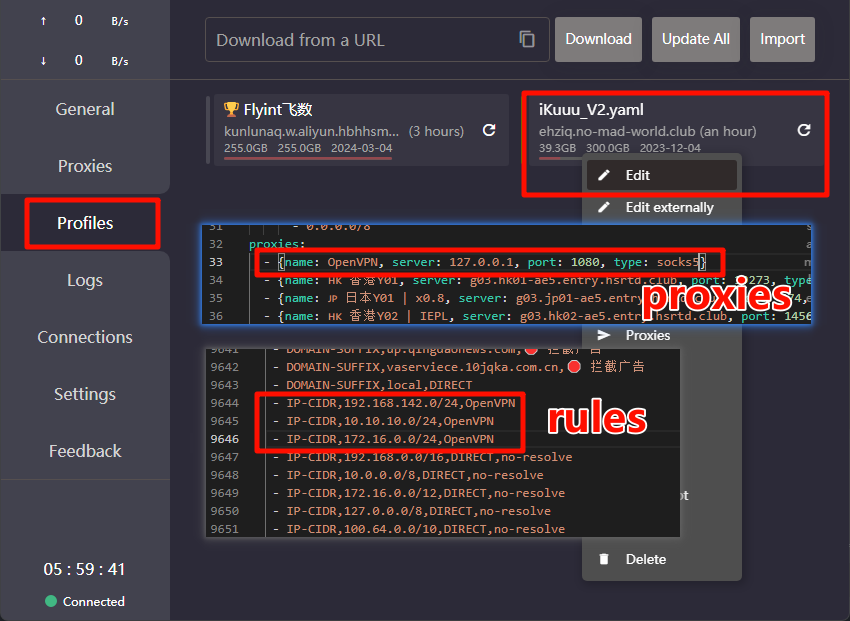
结合代理软件使用
使用 Clash 软件中的 规则配置 分流策略
1
2
3
4
5
6
7
|
proxies:
	- { name: OpenVPN, server: 127.0.0.1, port: 1080, type: socks5 }

rules:
	- IP-CIDR,192.168.142.0/24,OpenVPN
	- IP-CIDR,10.10.10.0/24,OpenVPN
	- IP-CIDR,172.16.0.0/24,OpenVPN
|
其他
除了 OpenVPN,还可以将 EasyConnect 等校园网 VPN (访问知网免费)经常使用的代理软件客户端部署到 Docker 中,并暴露 HTTP 或者 Socks ,并配置分流规则,达到优雅的访问其他网络环境的效果。
1
2
|
    - { name: 'CNKI', type: socks5, server: 10.10.10.45, port: 57080}
    - 'DOMAIN-SUFFIX,cnki.net,CNKI'
|