This article was published 462 days ago, some content may be outdated. If you have any questions, please leave a comment.
Using Ingress | Kubernetes as the application traffic proxy for K8s, and configuring certificates
Service Deployment
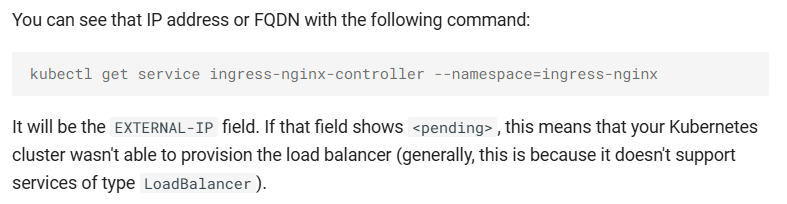
Since the K8S cluster used is not provided by a cloud provider, deploying metallb is required when using LoadBalancer-type services for ingress-nginx. MetalLB is a load balancer implementation for bare-metal Kubernetes clusters, using standard routing protocols.
1
2
3
4
5
6
7
8
9
|
# Preview configuration changes (returns non-zero if changes detected)
kubectl get configmap kube-proxy -n kube-system -o yaml | \
sed -e "s/strictARP: false/strictARP: true/" | \
kubectl diff -f - -n kube-system

# Apply ARP configuration changes (returns non-zero only on errors)
kubectl get configmap kube-proxy -n kube-system -o yaml | \
sed -e "s/strictARP: false/strictARP: true/" | \
kubectl apply -f - -n kube-system
|
1
2
|
# Install MetalLB components
kubectl apply -f https://raw.githubusercontent.com/metallb/metallb/v0.14.8/config/manifests/metallb-native.yaml
|
Create ip-pool.yaml to define the IP address pool:
 1
 2
 3
 4
 5
 6
 7
 8
 9
10
11
12
13
14
15
16
17
18
|
apiVersion: metallb.io/v1beta1
kind: IPAddressPool
metadata:
  name: default
  namespace: metallb-system
spec:
  addresses:
  - 172.16.0.90/32  # Manual IP assignment required for bare-metal clusters
  autoAssign: true
---
apiVersion: metallb.io/v1beta1
kind: L2Advertisement
metadata:
  name: default
  namespace: metallb-system
spec:
  ipAddressPools:
  - default
|
Deploy ingress-nginx
1
|
kubectl apply -f https://raw.githubusercontent.com/kubernetes/ingress-nginx/controller-v1.11.2/deploy/static/provider/cloud/deploy.yaml
|
Configuring Certificates
Here we introduce 3 certificate configuration methods: manually generating self-signed certificates, manually obtaining trusted certificates, and using cert-manager to acquire certificates.
Manual Self-Signed Certificate
You can use OpenSSL or other tools to apply for certificates.
The tls.crt certificate file and tls.key private key file, the base64 encoded content of the certificate and private key, can customize the relevant information of the certificate: country, province, city, company, department, domain name, validity period, etc.
 1
 2
 3
 4
 5
 6
 7
 8
 9
10
11
|
# Generate private key
openssl genrsa -out tls.key 2048 # Generate private key file tls.key

# Generate certificate request
openssl req -new -key tls.key -out tls.csr -subj "/C=CN/ST=<state>/L=<city>/O=<company>/OU=<department>/CN=<domain>" # Generate certificate request file tls.csr

# Generate certificate
openssl x509 -req -in tls.csr -signkey tls.key -out tls.crt -days 3650 # Generate certificate file tls.crt

# View certificate information
openssl x509 -in tls.crt -text -noout
|
test-ingress.yaml
 1
 2
 3
 4
 5
 6
 7
 8
 9
10
11
12
13
14
15
16
17
18
19
20
21
22
23
24
25
26
27
28
29
30
31
32
33
34
35
36
37
38
39
40
41
42
43
44
45
46
47
48
49
50
51
52
53
54
55
56
57
58
59
60
61
62
63
64
65
66
67
68
69
70
71
72
73
74
75
76
77
78
79
|
apiVersion: v1
kind: Namespace
metadata:
  name: test-ingress


---
apiVersion: apps/v1
kind: Deployment
metadata:
  name: service1
  namespace: test-ingress
spec:
  replicas: 1
  selector:
    matchLabels:
      app: service1
  template:
    metadata:
      labels:
        app: service1
    spec:
      containers:
      - name: service1
        image: nginx:alpine


---
apiVersion: v1
kind: Service
metadata:
  name: service1
  namespace: test-ingress
spec:
  selector:
    app: service1
  ports:
  - name: http
    protocol: TCP
    port: 80
    targetPort: 80


# letsencrypt certificate (manually created)
---
apiVersion: v1
kind: Secret
metadata:
  name: example-com
  namespace: test-ingress
data:
  tls.crt: <base64 encoded cert>
  tls.key: <base64 encoded key>
type: kubernetes.io/tls


---
apiVersion: networking.k8s.io/v1
kind: Ingress
metadata:
  name: test-ingress
  namespace: test-ingress
spec:
  ingressClassName: nginx
  tls:
    - hosts:
        - test.example.com
      secretName: example-com
  rules:
    - host: test.example.com
      http:
        paths:
          - path: /
            pathType: Prefix
            backend:
              service:
                name: service1
                port:
                  number: 80
|
1
|
kubectl apply -f test-ingress.yaml
|
Manual Trusted Certificate Application
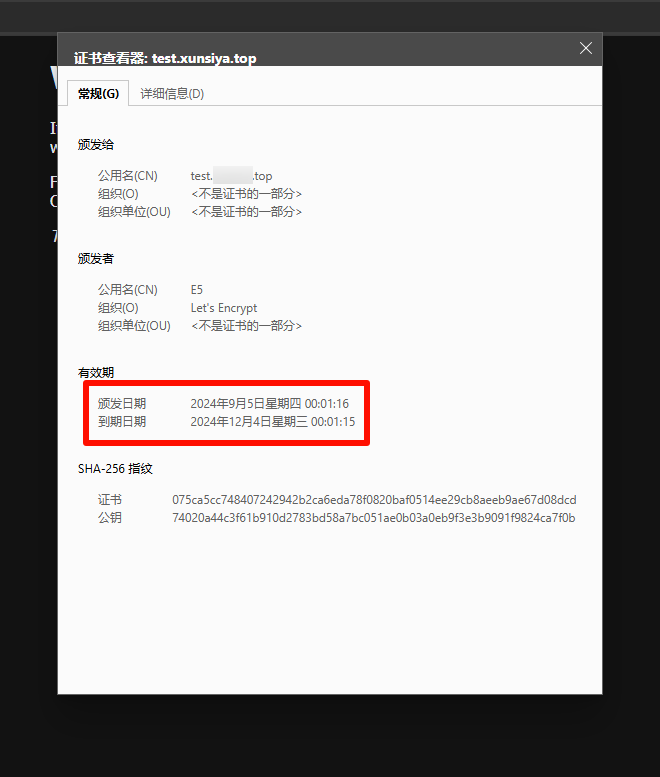
To apply for a certificate, you can use Let’s Encrypt or other Certificate Authorities (CAs).
The TLS certificate file (tls.crt) and private key file (tls.key) must be Base64-encoded. The default validity period is 90 days.
test-ingress.yaml
 1
 2
 3
 4
 5
 6
 7
 8
 9
10
11
12
13
14
15
16
17
18
19
20
21
22
23
24
25
26
27
28
29
30
31
32
33
34
35
36
37
38
39
40
41
42
43
44
45
46
47
48
49
50
51
52
53
54
55
56
57
58
59
60
61
62
63
64
65
66
67
68
69
70
71
72
73
74
75
|
apiVersion: v1
kind: Namespace
metadata:
  name: test-ingress

---
apiVersion: apps/v1
kind: Deployment
metadata:
  name: service1
  namespace: test-ingress
spec:
  replicas: 1
  selector:
    matchLabels:
      app: service1
  template:
    metadata:
      labels:
        app: service1
    spec:
      containers:
      - name: service1
        image: nginx:alpine

---
apiVersion: v1
kind: Service
metadata:
  name: service1
  namespace: test-ingress
spec:
  selector:
    app: service1
  ports:
  - name: http
    protocol: TCP
    port: 80
    targetPort: 80

# letsencrypt certificate (manually created)
---
apiVersion: v1
kind: Secret
metadata:
  name: example-com
  namespace: test-ingress
data:
  tls.crt: <base64 encoded cert>
  tls.key: <base64 encoded key>
type: kubernetes.io/tls

---
apiVersion: networking.k8s.io/v1
kind: Ingress
metadata:
  name: test-ingress
  namespace: test-ingress
spec:
  ingressClassName: nginx
  tls:
    - hosts:
        - test.example.com
      secretName: example-com
  rules:
    - host: test.example.com
      http:
        paths:
          - path: /
            pathType: Prefix
            backend:
              service:
                name: service1
                port:
                  number: 80
|
1
|
kubectl apply -f test-ingress.yaml
|
Using cert-manager to Obtain Certificates
cert-manager is a Kubernetes certificate management controller that utilizes CustomResourceDefinitions (CRDs), offering features such as certificate application, issuance, renewal, and deletion.
Below are three methods for obtaining certificates using cert-manager: SelfSigned Issuer-type certificates, ACME Issuer-type certificates, and CA Issuer-type certificates.
Installing cert-manager
1
|
kubectl apply -f https://github.com/cert-manager/cert-manager/releases/download/v1.15.3/cert-manager.yaml
|
By default, cert-manager will be installed in the cert-manager namespace. Although it can be deployed in a different namespace, this requires modifications to the deployment manifests.
After installation, verify the deployment by checking the pods in the cert-manager namespace:
1
2
3
4
5
6
|
$ kubectl get pods --namespace cert-manager

NAME                                       READY   STATUS    RESTARTS   AGE
cert-manager-cainjector-5fd6444f95-kmbmd   1/1     Running   0          60m
cert-manager-d894bbbd4-lrwp5               1/1     Running   0          60m
cert-manager-webhook-869674f96f-ljffr      1/1     Running   0          60m
|
Configuring SelfSigned Issuer Type Certificates
 test-ingress.yaml
  1
  2
  3
  4
  5
  6
  7
  8
  9
 10
 11
 12
 13
 14
 15
 16
 17
 18
 19
 20
 21
 22
 23
 24
 25
 26
 27
 28
 29
 30
 31
 32
 33
 34
 35
 36
 37
 38
 39
 40
 41
 42
 43
 44
 45
 46
 47
 48
 49
 50
 51
 52
 53
 54
 55
 56
 57
 58
 59
 60
 61
 62
 63
 64
 65
 66
 67
 68
 69
 70
 71
 72
 73
 74
 75
 76
 77
 78
 79
 80
 81
 82
 83
 84
 85
 86
 87
 88
 89
 90
 91
 92
 93
 94
 95
 96
 97
 98
 99
100
101
102
103
104
105
|
apiVersion: v1
kind: Namespace
metadata:
  name: test-ingress


---
apiVersion: apps/v1
kind: Deployment
metadata:
  name: service1
  namespace: test-ingress
spec:
  replicas: 1
  selector:
    matchLabels:
      app: service1
  template:
    metadata:
      labels:
        app: service1
    spec:
      containers:
      - name: service1
        image: nginx:alpine


---
apiVersion: v1
kind: Service
metadata:
  name: service1
  namespace: test-ingress
spec:
  selector:
    app: service1
  ports:
  - name: http
    protocol: TCP
    port: 80
    targetPort: 80


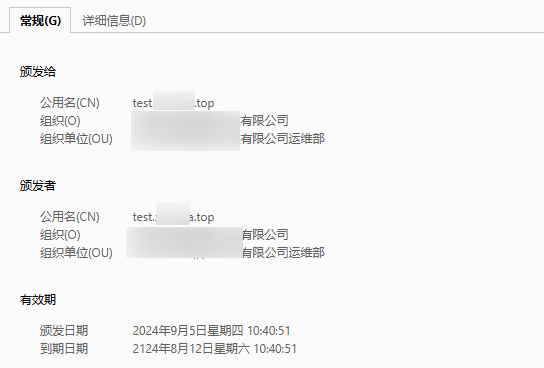
# SelfSigned Issuer: 100 years, automatically created
---
apiVersion: cert-manager.io/v1
kind: ClusterIssuer
metadata:
  name: selfsigned-issuer
  namespace: test-ingress
spec:
  selfSigned: {}

# SelfSigned Issuer: 100 years, automatically created
---
apiVersion: cert-manager.io/v1
kind: Certificate
metadata:
  name: example-com
  namespace: test-ingress
spec:
  secretName: example-com
  duration: 876000h  # 100 years
  renewBefore: 720h  # The certificate will be renewed 30 days before expiration
  issuerRef:
    name: selfsigned-issuer
    kind: ClusterIssuer
  commonName: test.example.com
  subject:
    organizations:
      - '*** Technology Co., Ltd.'
    organizationalUnits:
      - '*** Technology Co., Ltd. Operations Department'
  isCA: true
  privateKey:
    algorithm: RSA
    encoding: PKCS1
    size: 2048


---
apiVersion: networking.k8s.io/v1
kind: Ingress
metadata:
  name: test-ingress
  namespace: test-ingress
  annotations:
    cert-manager.io/cluster-issuer: selfsigned-issuer
spec:
  ingressClassName: nginx
  tls:
    - hosts:
        - test.example.com
      secretName: example-com
  rules:
    - host: test.example.com
      http:
        paths:
          - path: /
            pathType: Prefix
            backend:
              service:
                name: service1
                port:
                  number: 80
|
1
|
kubectl apply -f test-ingress.yaml
|
ACME (Automated Certificate Management Environment) is a protocol used for automated certificate issuance and renewal. The ACME protocol is standardized by the IETF, with the most common current implementation being Let’s Encrypt. A key feature of the ACME protocol is that it allows Certificate Authorities (CAs) to verify the identity of certificate requesters without requiring human intervention. Another critical feature of the ACME protocol is its ability to enable automatic certificate renewal by CAs without manual involvement.
The Issuer type represents an individual account registered with an ACME certificate authority server. When creating a new ACME Issuer, the Certificate Manager will generate a private key used for identification on the ACME server.
By default, certificates issued by public ACME servers are typically trusted by client computers. This means that, for example, websites secured by ACME certificates issued for specific URLs will be automatically trusted by most web browsers. ACME certificates are generally free.
Configuring ACME Issuer with HTTP01 Certificate Type
The HTTP01 challenge is completed by exposing a computed secret key at a publicly accessible HTTP URL endpoint. This URL will use the domain name for which the certificate is being requested. Once the ACME server can retrieve this secret key from the URL via the internet, it verifies your ownership of the domain.
When creating an HTTP01 challenge, cert-manager will automatically configure your cluster ingress to route traffic accessing this URL to a small web server that presents the secret key. In simpler terms, cert-manager automatically creates an ingress route to a lightweight web server responsible for displaying the verification key, thereby proving domain ownership.
Note:
- Fake certificate (1-year validity, auto-created):
kubernetes ingress controller fake cert
- Example file:
test-ingress.yaml
 1
 2
 3
 4
 5
 6
 7
 8
 9
10
11
12
13
14
15
16
17
18
19
20
21
22
23
24
25
26
27
28
29
30
31
32
33
34
35
36
37
38
39
40
41
42
43
44
45
46
47
48
49
50
51
52
53
54
55
56
57
58
59
60
61
62
63
64
65
66
67
68
69
70
71
72
73
74
75
76
77
78
79
80
81
82
83
|
apiVersion: v1
kind: Namespace
metadata:
  name: test-ingress

---
apiVersion: apps/v1
kind: Deployment
metadata:
  name: service1
  namespace: test-ingress
spec:
  replicas: 1
  selector:
    matchLabels:
      app: service1
  template:
    metadata:
      labels:
        app: service1
    spec:
      containers:
      - name: service1
        image: nginx:alpine

---
apiVersion: v1
kind: Service
metadata:
  name: service1
  namespace: test-ingress
spec:
  selector:
    app: service1
  ports:
  - name: http
    protocol: TCP
    port: 80
    targetPort: 80

# ACME certificate, automatically created
---
apiVersion: cert-manager.io/v1
kind: ClusterIssuer
metadata:
  name: sencrypt-prod
  namespace: test-ingress
spec:
  acme:
    email: CoderKang@hotmail.com
    privateKeySecretRef:
      name: sencrypt-prod
    server: https://acme-v02.api.letsencrypt.org/directory
    solvers:
      - http01:
          ingress:
            class: nginx

---
apiVersion: networking.k8s.io/v1
kind: Ingress
metadata:
  name: test-ingress
  namespace: test-ingress
  annotations:
    cert-manager.io/cluster-issuer: sencrypt-prod
spec:
  ingressClassName: nginx
  tls:
    - hosts:
        - test.example.com
      secretName: example-com
  rules:
    - host: test.example.com
      http:
        paths:
          - path: /
            pathType: Prefix
            backend:
              service:
                name: service1
                port:
                  number: 80
|
1
|
kubectl apply -f test-ingress.yaml
|
Configuring ACME Issuer dns01-type Certificates
The DNS01 challenge is completed by providing a cryptographic key that exists in a DNS TXT record. Once this TXT record propagates across the internet, the ACME server can retrieve the key via DNS queries and verify that the client requesting the certificate is the domain owner.
If proper permissions are granted, cert-manager will automatically add this TXT record to your specified DNS provider.
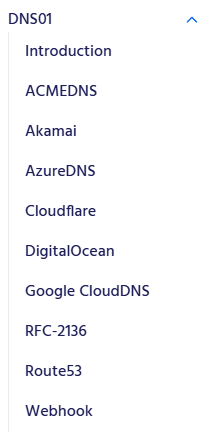
However, since Tencent Cloud DNS is used here, and cert-manager does not natively support Tencent Cloud DNS, a custom resolver (cert-manager webhook) is required.
DNS01 - cert-manager Documentation
1
|
kubectl apply -f https://raw.githubusercontent.com/imroc/cert-manager-webhook-dnspod/master/bundle.yaml
|
test-ingress.yaml
  1
  2
  3
  4
  5
  6
  7
  8
  9
 10
 11
 12
 13
 14
 15
 16
 17
 18
 19
 20
 21
 22
 23
 24
 25
 26
 27
 28
 29
 30
 31
 32
 33
 34
 35
 36
 37
 38
 39
 40
 41
 42
 43
 44
 45
 46
 47
 48
 49
 50
 51
 52
 53
 54
 55
 56
 57
 58
 59
 60
 61
 62
 63
 64
 65
 66
 67
 68
 69
 70
 71
 72
 73
 74
 75
 76
 77
 78
 79
 80
 81
 82
 83
 84
 85
 86
 87
 88
 89
 90
 91
 92
 93
 94
 95
 96
 97
 98
 99
100
101
102
103
104
105
106
107
108
109
110
111
112
113
114
115
116
117
118
119
120
|
apiVersion: v1
kind: Namespace
metadata:
  name: test-ingress


---
apiVersion: apps/v1
kind: Deployment
metadata:
  name: service1
  namespace: test-ingress
spec:
  replicas: 1
  selector:
    matchLabels:
      app: service1
  template:
    metadata:
      labels:
        app: service1
    spec:
      containers:
      - name: service1
        image: nginx:alpine


---
apiVersion: v1
kind: Service
metadata:
  name: service1
  namespace: test-ingress
spec:
  selector:
    app: service1
  ports:
  - name: http
    protocol: TCP
    port: 80
    targetPort: 80


# letsencrypt automatically created, valid for 90 days
# Configure the SecretId and SecretKey of the Tencent Cloud DNS provider
# https://console.dnspod.cn/account/token/apikey
---
apiVersion: v1
stringData:
  secret-key: <tencent cloud secret key>  # Tencent Cloud SecretKey
kind: Secret
metadata:
  name: dnspod-secret
  namespace: cert-manager
type: Opaque

---
apiVersion: cert-manager.io/v1
kind: ClusterIssuer
metadata:
  name: sencrypt-prod
  namespace: test-ingress
spec:
  acme:
    email: CoderKang@hotmail.com
    preferredChain: ""
    privateKeySecretRef:
      name: dnspod-letsencrypt
    server: https://acme-v02.api.letsencrypt.org/directory
    solvers:
      - dns01:
          webhook:
            config:
              secretId: <tencent cloud secret id>  # Tencent Cloud SecretId
              secretKeyRef:
                key: secret-key
                name: dnspod-secret
              ttl: 600
            groupName: acme.imroc.cc
            solverName: dnspod

---
apiVersion: cert-manager.io/v1
kind: Certificate
metadata:
  name: example-com
  namespace: test-ingress
spec:
  dnsNames:
    - test.example.com
  issuerRef:
    kind: ClusterIssuer
    name: sencrypt-prod
  secretName: example-com

---
apiVersion: networking.k8s.io/v1
kind: Ingress
metadata:
  name: test-ingress
  namespace: test-ingress
  annotations:
    cert-manager.io/cluster-issuer: sencrypt-prod
spec:
  ingressClassName: nginx
  tls:
    - hosts:
        - test.example.com
      secretName: example-com
  rules:
    - host: test.example.com
      http:
        paths:
          - path: /
            pathType: Prefix
            backend:
              service:
                name: service1
                port:
                  number: 80
|
1
|
kubectl apply -f test-ingress.yaml
|