使用 Ingress | Kubernetes 作为 K8s 的应用流量转发代理,并配置证书
服务部署
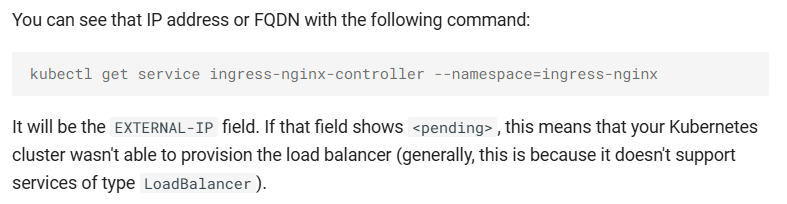
由于使用的 K8S 集群并非云服务商提供的,需要使用 ingress-nginx 的 LoadBalancer 类型服务的话,先部署 metallb,MetalLB 是裸机 Kubernetes 集群的负载均衡器实现,使用标准路由协议。
1
2
3
4
5
6
7
8
9
|
# see what changes would be made, returns nonzero returncode if different
kubectl get configmap kube-proxy -n kube-system -o yaml | \
sed -e "s/strictARP: false/strictARP: true/" | \
kubectl diff -f - -n kube-system

# actually apply the changes, returns nonzero returncode on errors only
kubectl get configmap kube-proxy -n kube-system -o yaml | \
sed -e "s/strictARP: false/strictARP: true/" | \
kubectl apply -f - -n kube-system
|
1
|
kubectl apply -f https://raw.githubusercontent.com/metallb/metallb/v0.14.8/config/manifests/metallb-native.yaml
|
ip-pool.yaml 创建 IP 池:
 1
 2
 3
 4
 5
 6
 7
 8
 9
10
11
12
13
14
15
16
17
18
|
apiVersion: metallb.io/v1beta1
kind: IPAddressPool
metadata:
  name: default
  namespace: metallb-system
spec:
  addresses:
  - 172.16.0.90/32  # 由于是裸机集群,需要手动指定 IP 地址
  autoAssign: true
---
apiVersion: metallb.io/v1beta1
kind: L2Advertisement
metadata:
  name: default
  namespace: metallb-system
spec:
  ipAddressPools:
  - default
|
1
|
kubectl apply -f ip-pool.yaml
|
部署 ingress-nginx
1
|
kubectl apply -f https://raw.githubusercontent.com/kubernetes/ingress-nginx/controller-v1.11.2/deploy/static/provider/cloud/deploy.yaml
|
配置证书
下面介绍 3 种方式配置证书:分别是手动申请自签名证书、手动申请受信任证书、使用 cert-manager 申请证书
手动申请自签名证书
申请证书,可以使用 OpenSSL,也可以使用其他工具
tls.crt 证书文件、tls.key 私钥文件,base64 编码后的内容,可以定制证书的相关信息:国家、省、市、公司、部门、域名、有效时间等
 1
 2
 3
 4
 5
 6
 7
 8
 9
10
11
|
# 生成私钥
openssl genrsa -out tls.key 2048 # 生成私钥文件 tls.key

# 生成证书请求
openssl req -new -key tls.key -out tls.csr -subj "/C=<country>/ST=<province>/L=<city>/O=<company>/OU=<department>/CN=<domain>" # 生成证书请求文件 tls.csr

# 生成证书
openssl x509 -req -in tls.csr -signkey tls.key -out tls.crt -days 3650 # 生成证书文件 tls.crt

# 查看证书信息
openssl x509 -in tls.crt -text -noout
|
test-ingress.yaml
 1
 2
 3
 4
 5
 6
 7
 8
 9
10
11
12
13
14
15
16
17
18
19
20
21
22
23
24
25
26
27
28
29
30
31
32
33
34
35
36
37
38
39
40
41
42
43
44
45
46
47
48
49
50
51
52
53
54
55
56
57
58
59
60
61
62
63
64
65
66
67
68
69
70
71
72
73
74
75
76
77
78
79
|
apiVersion: v1
kind: Namespace
metadata:
  name: test-ingress


---
apiVersion: apps/v1
kind: Deployment
metadata:
  name: service1
  namespace: test-ingress
spec:
  replicas: 1
  selector:
    matchLabels:
      app: service1
  template:
    metadata:
      labels:
        app: service1
    spec:
      containers:
      - name: service1
        image: nginx:alpine


---
apiVersion: v1
kind: Service
metadata:
  name: service1
  namespace: test-ingress
spec:
  selector:
    app: service1
  ports:
  - name: http
    protocol: TCP
    port: 80
    targetPort: 80


# letsencrypt 证书,手动创建
---
apiVersion: v1
kind: Secret
metadata:
  name: <domain>
  namespace: test-ingress
data:
  tls.crt: <base64 encoded cert>
  tls.key: <base64 encoded key>
type: kubernetes.io/tls


---
apiVersion: networking.k8s.io/v1
kind: Ingress
metadata:
  name: test-ingress
  namespace: test-ingress
spec:
  ingressClassName: nginx
  tls:
    - hosts:
        - <domain>
      secretName: <secret name>
  rules:
    - host: <domain>
      http:
        paths:
          - path: /
            pathType: Prefix
            backend:
              service:
                name: service1
                port:
                  number: 80
|
1
|
kubectl apply -f test-ingress.yaml
|
手动申请受信任证书
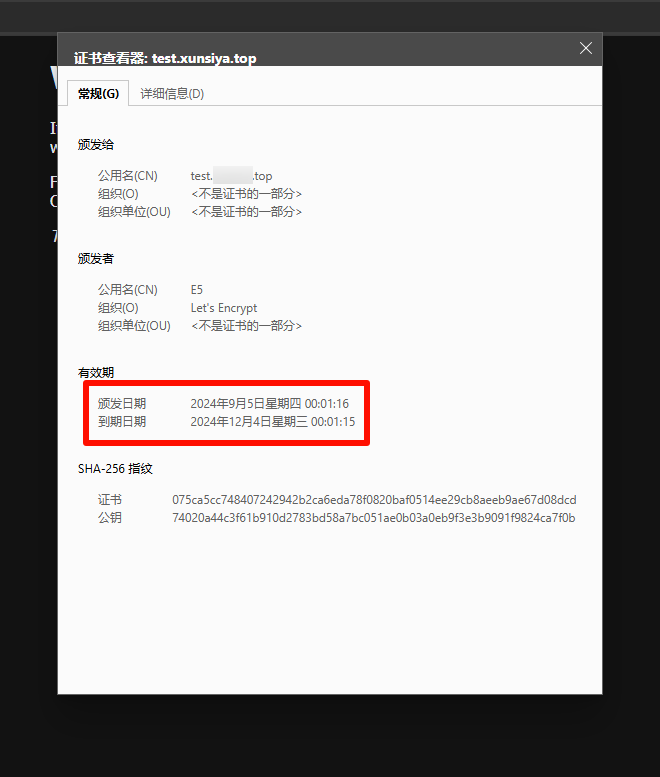
申请证书,可以使用 Let’s Encrypt,也可以使用其他证书颁发机构
tls.crt 证书文件、tls.key 私钥文件,base64 编码后的内容,默认有效时间 90 天
test-ingress.yaml
 1
 2
 3
 4
 5
 6
 7
 8
 9
10
11
12
13
14
15
16
17
18
19
20
21
22
23
24
25
26
27
28
29
30
31
32
33
34
35
36
37
38
39
40
41
42
43
44
45
46
47
48
49
50
51
52
53
54
55
56
57
58
59
60
61
62
63
64
65
66
67
68
69
70
71
72
73
74
75
76
77
78
79
|
apiVersion: v1
kind: Namespace
metadata:
  name: test-ingress


---
apiVersion: apps/v1
kind: Deployment
metadata:
  name: service1
  namespace: test-ingress
spec:
  replicas: 1
  selector:
    matchLabels:
      app: service1
  template:
    metadata:
      labels:
        app: service1
    spec:
      containers:
      - name: service1
        image: nginx:alpine


---
apiVersion: v1
kind: Service
metadata:
  name: service1
  namespace: test-ingress
spec:
  selector:
    app: service1
  ports:
  - name: http
    protocol: TCP
    port: 80
    targetPort: 80


# letsencrypt 证书,手动创建
---
apiVersion: v1
kind: Secret
metadata:
  name: <domain>
  namespace: test-ingress
data:
  tls.crt: <base64 encoded cert>
  tls.key: <base64 encoded key>
type: kubernetes.io/tls


---
apiVersion: networking.k8s.io/v1
kind: Ingress
metadata:
  name: test-ingress
  namespace: test-ingress
spec:
  ingressClassName: nginx
  tls:
    - hosts:
        - <domain>
      secretName: <secret name>
  rules:
    - host: <domain>
      http:
        paths:
          - path: /
            pathType: Prefix
            backend:
              service:
                name: service1
                port:
                  number: 80
|
1
|
kubectl apply -f test-ingress.yaml
|
使用 cert-manager 申请证书
cert-manager 是一个 Kubernetes 证书管理控制器,基于 Kubernetes 的 CustomResourceDefinitions 资源,提供了证书申请、颁发、更新、删除等功能
下面介绍如何使用 cert-manager 申请证书,三种方式:SelfSigned Issuer 类型证书、ACME Issuer 类型证书、CA Issuer 类型证书
安装 cert-manager
1
|
kubectl apply -f https://github.com/cert-manager/cert-manager/releases/download/v1.15.3/cert-manager.yaml
|
默认情况下,cert-manager 将安装到 cert-manager 命名空间中。可以在不同的命名空间中运行证书管理器,尽管需要对部署清单进行修改。
安装证书管理器后,可以通过检查运行Pod的证书管理器命名空间来验证它是否正确部署:
1
2
3
4
5
6
|
$ kubectl get pods --namespace cert-manager

NAME                                       READY   STATUS    RESTARTS   AGE
cert-manager-cainjector-5fd6444f95-kmbmd   1/1     Running   0          60m
cert-manager-d894bbbd4-lrwp5               1/1     Running   0          60m
cert-manager-webhook-869674f96f-ljffr      1/1     Running   0          60m
|
配置 SelfSigned Issuer 类型证书
test-ingress.yaml
  1
  2
  3
  4
  5
  6
  7
  8
  9
 10
 11
 12
 13
 14
 15
 16
 17
 18
 19
 20
 21
 22
 23
 24
 25
 26
 27
 28
 29
 30
 31
 32
 33
 34
 35
 36
 37
 38
 39
 40
 41
 42
 43
 44
 45
 46
 47
 48
 49
 50
 51
 52
 53
 54
 55
 56
 57
 58
 59
 60
 61
 62
 63
 64
 65
 66
 67
 68
 69
 70
 71
 72
 73
 74
 75
 76
 77
 78
 79
 80
 81
 82
 83
 84
 85
 86
 87
 88
 89
 90
 91
 92
 93
 94
 95
 96
 97
 98
 99
100
101
102
103
104
105
|
apiVersion: v1
kind: Namespace
metadata:
  name: test-ingress


---
apiVersion: apps/v1
kind: Deployment
metadata:
  name: service1
  namespace: test-ingress
spec:
  replicas: 1
  selector:
    matchLabels:
      app: service1
  template:
    metadata:
      labels:
        app: service1
    spec:
      containers:
      - name: service1
        image: nginx:alpine


---
apiVersion: v1
kind: Service
metadata:
  name: service1
  namespace: test-ingress
spec:
  selector:
    app: service1
  ports:
  - name: http
    protocol: TCP
    port: 80
    targetPort: 80


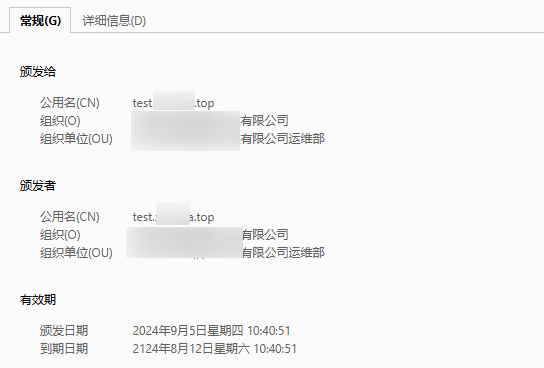
# SelfSigned 证书 100 年,自动创建
---
apiVersion: cert-manager.io/v1
kind: ClusterIssuer
metadata:
  name: selfsigned-issuer
  namespace: test-ingress
spec:
  selfSigned: {}

# SelfSigned 证书 100 年,自动创建
---
apiVersion: cert-manager.io/v1
kind: Certificate
metadata:
  name: <domain>
  namespace: test-ingress
spec:
  secretName: <secret name>
  duration: 876000h  # 100 years
  renewBefore: 720h  # 在证书过期前 30 天自动续签
  issuerRef:
    name: selfsigned-issuer
    kind: ClusterIssuer
  commonName: <domain>
  subject:
    organizations:
      - <company>
    organizationalUnits:
      - <department>
  isCA: true
  privateKey:
    algorithm: RSA
    encoding: PKCS1
    size: 2048


---
apiVersion: networking.k8s.io/v1
kind: Ingress
metadata:
  name: test-ingress
  namespace: test-ingress
  annotations:
    cert-manager.io/cluster-issuer: selfsigned-issuer
spec:
  ingressClassName: nginx
  tls:
    - hosts:
        - <domain>
      secretName: <secret name>
  rules:
    - host: <domain>
      http:
        paths:
          - path: /
            pathType: Prefix
            backend:
              service:
                name: service1
                port:
                  number: 80
|
1
|
kubectl apply -f test-ingress.yaml
|
ACME(Automated Certificate Management Environment)是一种协议,用于自动化证书颁发和更新。ACME协议由IETF标准化,目前最常见的实现是Let’s Encrypt。ACME协议的一个关键特性是,它允许证书颁发机构(CA)在不需要人工干预的情况下验证证书请求者的身份。ACME 协议的另一个关键特性是,它允许证书颁发机构自动更新证书,而无需人工干预。
颁发者类型表示在自动证书管理环境(ACME)证书颁发机构服务器上注册的单个帐户。创建新的ACME颁发者时,证书管理器将生成一个私钥,用于在ACME服务器上识别。
默认情况下,公共ACME服务器颁发的证书通常由客户端的计算机信任。这意味着,例如,访问由为该URL颁发的ACME证书支持的网站,默认情况下会被大多数客户端的web浏览器信任。ACME证书通常是免费的。
配置 ACME Issuer http01 类型证书
HTTP01 质询是通过展示一个计算出的密钥来完成的,这个密钥需要出现在一个可通过互联网访问的 HTTP URL 端点上。这个 URL 将使用申请证书的域名。一旦 ACME 服务器能够通过互联网从这个 URL 获取到这个密钥,就能验证你是该域名的拥有者。
当创建 HTTP01 质询时,cert-manager 会自动配置你的集群入口(ingress),将访问这个 URL 的流量路由到一个小型的网络服务器上,由它展示该密钥。
通俗的说,就是 cert-manager 会自动创建 ingress 路由到一个小型的网络服务器上,由它展示该密钥,以验证你是该域名的拥有者。
fake 证书一年,自动创建:kubernetes ingress controller fake cert
test-ingress.yaml
 1
 2
 3
 4
 5
 6
 7
 8
 9
10
11
12
13
14
15
16
17
18
19
20
21
22
23
24
25
26
27
28
29
30
31
32
33
34
35
36
37
38
39
40
41
42
43
44
45
46
47
48
49
50
51
52
53
54
55
56
57
58
59
60
61
62
63
64
65
66
67
68
69
70
71
72
73
74
75
76
77
78
79
80
81
82
83
84
85
86
|
apiVersion: v1
kind: Namespace
metadata:
  name: test-ingress


---
apiVersion: apps/v1
kind: Deployment
metadata:
  name: service1
  namespace: test-ingress
spec:
  replicas: 1
  selector:
    matchLabels:
      app: service1
  template:
    metadata:
      labels:
        app: service1
    spec:
      containers:
      - name: service1
        image: nginx:alpine


---
apiVersion: v1
kind: Service
metadata:
  name: service1
  namespace: test-ingress
spec:
  selector:
    app: service1
  ports:
  - name: http
    protocol: TCP
    port: 80
    targetPort: 80

# ACME 证书,自动创建
---
apiVersion: cert-manager.io/v1
kind: ClusterIssuer
metadata:
  name: sencrypt-prod
  namespace: test-ingress
spec:
  acme:
    email: CoderKang@hotmail.com
    privateKeySecretRef:
      name: sencrypt-prod
    server: https://acme-v02.api.letsencrypt.org/directory
    solvers:
      - http01:
          ingress:
            class: nginx


---
apiVersion: networking.k8s.io/v1
kind: Ingress
metadata:
  name: test-ingress
  namespace: test-ingress
  annotations:
    cert-manager.io/cluster-issuer: sencrypt-prod
spec:
  ingressClassName: nginx
  tls:
    - hosts:
        - test.example.com
      secretName: example-com
  rules:
    - host: test.example.com
      http:
        paths:
          - path: /
            pathType: Prefix
            backend:
              service:
                name: service1
                port:
                  number: 80
|
1
|
kubectl apply -f test-ingress.yaml
|
配置 ACME Issuer dns01 类型证书
DNS01 质询是通过提供一个存在于 DNS TXT 记录中的计算密钥来完成的。一旦这个 TXT 记录在互联网中传播开,ACME 服务器就能通过 DNS 查询成功获取该密钥,并验证申请证书的客户端是该域名的拥有者。
如果拥有正确的权限,cert-manager 会自动在你指定的 DNS 服务提供商处添加这个 TXT 记录。
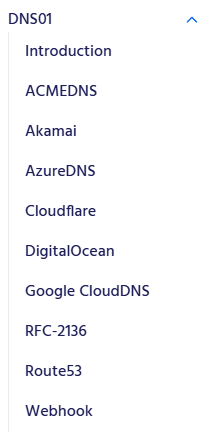
但是此次使用的是腾讯云 DNS 服务商,cert-manager 默认不支持腾讯云 DNS 服务商,需要自定义解析器 cert-manager webhook
DNS01 - cert-manager Documentation
1
|
kubectl apply -f https://raw.githubusercontent.com/imroc/cert-manager-webhook-dnspod/master/bundle.yaml
|
test-ingress.yaml
  1
  2
  3
  4
  5
  6
  7
  8
  9
 10
 11
 12
 13
 14
 15
 16
 17
 18
 19
 20
 21
 22
 23
 24
 25
 26
 27
 28
 29
 30
 31
 32
 33
 34
 35
 36
 37
 38
 39
 40
 41
 42
 43
 44
 45
 46
 47
 48
 49
 50
 51
 52
 53
 54
 55
 56
 57
 58
 59
 60
 61
 62
 63
 64
 65
 66
 67
 68
 69
 70
 71
 72
 73
 74
 75
 76
 77
 78
 79
 80
 81
 82
 83
 84
 85
 86
 87
 88
 89
 90
 91
 92
 93
 94
 95
 96
 97
 98
 99
100
101
102
103
104
105
106
107
108
109
110
111
112
113
114
115
116
117
118
119
120
|
apiVersion: v1
kind: Namespace
metadata:
  name: test-ingress


---
apiVersion: apps/v1
kind: Deployment
metadata:
  name: service1
  namespace: test-ingress
spec:
  replicas: 1
  selector:
    matchLabels:
      app: service1
  template:
    metadata:
      labels:
        app: service1
    spec:
      containers:
      - name: service1
        image: nginx:alpine


---
apiVersion: v1
kind: Service
metadata:
  name: service1
  namespace: test-ingress
spec:
  selector:
    app: service1
  ports:
  - name: http
    protocol: TCP
    port: 80
    targetPort: 80


# letsencrypt 自动创建,有效期 90 天
# 配置腾讯云 DNS 服务商的 SecretId 和 SecretKey
# https://console.dnspod.cn/account/token/apikey
---
apiVersion: v1
stringData:
  secret-key: <tencent cloud secret key>  # 腾讯云 SecretKey
kind: Secret
metadata:
  name: dnspod-secret
  namespace: cert-manager
type: Opaque

---
apiVersion: cert-manager.io/v1
kind: ClusterIssuer
metadata:
  name: sencrypt-prod
  namespace: test-ingress
spec:
  acme:
    email: CoderKang@hotmail.com
    preferredChain: ""
    privateKeySecretRef:
      name: dnspod-letsencrypt
    server: https://acme-v02.api.letsencrypt.org/directory
    solvers:
      - dns01:
          webhook:
            config:
              secretId: <tencent cloud secret id>  # 腾讯云 SecretId
              secretKeyRef:
                key: secret-key
                name: dnspod-secret
              ttl: 600
            groupName: acme.imroc.cc
            solverName: dnspod

---
apiVersion: cert-manager.io/v1
kind: Certificate
metadata:
  name: example-com
  namespace: test-ingress
spec:
  dnsNames:
    - test.example.com
  issuerRef:
    kind: ClusterIssuer
    name: sencrypt-prod
  secretName: example-com

---
apiVersion: networking.k8s.io/v1
kind: Ingress
metadata:
  name: test-ingress
  namespace: test-ingress
  annotations:
    cert-manager.io/cluster-issuer: sencrypt-prod
spec:
  ingressClassName: nginx
  tls:
    - hosts:
        - test.example.com
      secretName: example-com
  rules:
    - host: test.example.com
      http:
        paths:
          - path: /
            pathType: Prefix
            backend:
              service:
                name: service1
                port:
                  number: 80
|
1
|
kubectl apply -f test-ingress.yaml
|