A containerized OpenVPN client solution featuring killswitch implementation using iptables and seamless proxy integration through SOCKS5. Includes complete Docker configurations, routing policies and traffic splitting strategies with Clash proxy rules.
This article was published 1378 days ago, some content may be outdated. If you have any questions, please leave a comment.
To resolve conflicts between OpenVPN and proxy software
wfg/docker-openvpn-client: OpenVPN client with killswitch and proxy servers; built on Alpine (github.com)
Build Files
Dockerfile
 1
 2
 3
 4
 5
 6
 7
 8
 9
10
11
12
13
14
FROM alpine:3.17
RUN apk add --no-cache \
bash \
bind-tools \
iptables \
ip6tables \
openvpn
COPY . /usr/local/bin
ENV KILL_SWITCH = on
ENTRYPOINT [ "entry.sh" ]
killswitch
 1
 2
 3
 4
 5
 6
 7
 8
 9
10
11
12
13
14
15
16
17
18
19
20
21
22
23
24
25
26
27
28
29
30
31
32
33
34
35
36
37
38
39
40
41
42
#!/usr/bin/env bash
set -o errexit
set -o nounset
set -o pipefail
# Block all traffic not going through tun0 interface
iptables --insert OUTPUT \
! --out-interface tun0 \
--match addrtype ! --dst-type LOCAL \
! --destination " $( ip -4 -oneline addr show dev eth0 | awk 'NR == 1 { print $4 }' ) " \
--jump REJECT
# Create static routes for allowed subnets
default_gateway = $( ip -4 route | awk '$1 == "default" { print $3 }' )
for subnet in ${ 1 //,/ } ; do
ip route add " $subnet " via " $default_gateway "
iptables --insert OUTPUT --destination " $subnet " --jump ACCEPT
done
# Whitelist OpenVPN server addresses
global_port = $( awk '$1 == "port" { print $2 }' " ${ config :? "config file not found by kill switch" } " )
global_protocol = $( awk '$1 == "proto" { print $2 }' " ${ config :? "config file not found by kill switch" } " )
remotes = $( awk '$1 == "remote" { print $2, $3, $4 }' " ${ config :? "config file not found by kill switch" } " )
ip_regex = '^(([1-9]?[0-9]|1[0-9][0-9]|2([0-4][0-9]|5[0-5]))\.){3}([1-9]?[0-9]|1[0-9][0-9]|2([0-4][0-9]|5[0-5]))$'
while IFS = read -r line; do
# Process each remote entry
IFS = " " read -ra remote <<< " ${ line %% \# * } "
address = ${ remote [0] }
port = ${ remote [1] :- ${ global_port :- 1194 }}
protocol = ${ remote [2] :- ${ global_protocol :- udp }}
# Allow IP addresses and handle domain resolution
if [[ $address = ~ $ip_regex ]] ; then
iptables --insert OUTPUT --destination " $address " --protocol " $protocol " --destination-port " $port " --jump ACCEPT
else
for ip in $( dig -4 +short " $address " ) ; do
iptables --insert OUTPUT --destination " $ip " --protocol " $protocol " --destination-port " $port " --jump ACCEPT
echo " $ip $address " >> /etc/hosts
done
fi
done <<< " $remotes "
entry.sh
 1
 2
 3
 4
 5
 6
 7
 8
 9
10
11
12
13
14
15
16
17
18
19
20
21
22
23
24
25
26
27
28
29
30
31
32
33
34
35
36
37
38
39
40
41
42
43
44
45
46
47
48
49
#!/usr/bin/env bash
set -o errexit
set -o nounset
set -o pipefail
cleanup() {
kill TERM " $openvpn_pid "
exit 0
}
is_enabled() {
[[ ${ 1 ,, } = ~ ^( true| t| yes| y| 1| on| enable| enabled) $ ]]
}
# Either a specific file name or a pattern.
if [[ $CONFIG_FILE ]] ; then
config_file = $( find /config -name " $CONFIG_FILE " 2> /dev/null | sort | shuf -n 1)
else
config_file = $( find /config -name '*.conf' -o -name '*.ovpn' 2> /dev/null | sort | shuf -n 1)
fi
if [[ -z $config_file ]] ; then
echo "no openvpn configuration file found" >& 2
exit 1
fi
echo "using openvpn configuration file: $config_file "
openvpn_args =(
"--config" " $config_file "
"--cd" "/config"
)
if is_enabled " $KILL_SWITCH " ; then
openvpn_args +=( "--route-up" "/usr/local/bin/killswitch.sh $ALLOWED_SUBNETS " )
fi
# Docker secret that contains the credentials for accessing the VPN.
if [[ $AUTH_SECRET ]] ; then
openvpn_args +=( "--auth-user-pass" "/run/secrets/ $AUTH_SECRET " )
fi
openvpn " ${ openvpn_args [@] } " &
openvpn_pid = $!
trap cleanup TERM
wait $openvpn_pid
Build and Start
docker-compose.yaml
 1
 2
 3
 4
 5
 6
 7
 8
 9
10
11
12
13
14
15
16
17
18
19
20
21
services :
openvpn-client :
image : openvpn-client:latest # ghcr.io/wfg/openvpn-client
build :
context : ./
dockerfile : Dockerfile
container_name : openvpn-client
cap_add :
- NET_ADMIN
environment :
# - HTTP_PROXY=on
- SOCKS_PROXY=on
devices :
- /dev/net/tun:/dev/net/tun
volumes :
- ./local:/config
- ./local:/data/vpn
ports :
# - 8080:8080 # HTTP_PROXY port
- 1080 : 1080 # SOCKS_PROXY port
restart : unless-stopped
Using with Proxy Software
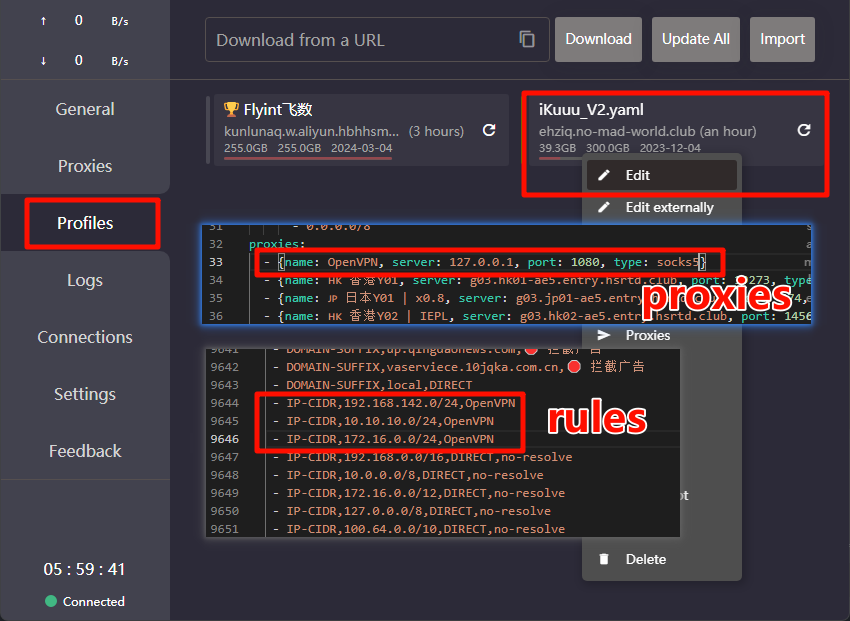
Utilizing the Rule Configuration routing policy in Clash software
1
2
3
4
5
6
7
proxies :
- { name: OpenVPN, server: 127.0.0.1, port: 1080, type : socks5 }
rules :
- IP-CIDR,192.168.142.0/24,OpenVPN
- IP-CIDR,10.10.10.0/24,OpenVPN
- IP-CIDR,172.16.0.0/24,OpenVPN
One More Thing
In addition to OpenVPN, other campus VPN clients like EasyConnect (used for free CNKI access) can be deployed in Docker containers. Expose HTTP/SOCKS proxies and configure routing rules to achieve elegant cross-network environment access.
1
2
- { name: 'CNKI', type: socks5, server: 10.10.10.45, port : 57080 }
- 'DOMAIN-SUFFIX,cnki.net,CNKI'