本文详细讲解如何通过Iptables和Ipset模块,结合全球IP地址库实现屏蔽国外IP访问服务器,有效提升服务器安全性的实施方案。包含IP段下载、规则配置、持久化设置等完整操作流程。
这篇文章已发布 446 天,部分内容可能已过时。如有疑问,可在评论区留言。
为什么需要屏蔽国外IP
公网服务器面临的安全威胁日益严峻:
- 互联网上有大量扫描器24小时不间断扫描服务器,试图获取权限控制您的系统
- 服务器日志分析表明大多数攻击来源于国外服务器,如荷兰、美国、新加坡、日本等国家
- 不论是云服务器还是IDC机房托管的服务器,只要对外提供服务就会暴露端口,增加安全风险
解决方案概述
对于主要面向国内用户的服务,我们可以通过屏蔽国外IP访问来显著提升安全性。
技术原理
- Iptables:Linux系统防火墙工具,用于过滤和拦截请求
- Ipset模块:Iptables的扩展,支持高效匹配大批量IP地址段
- IPdeny:提供定期更新的全球IP地址分配数据
实现思路
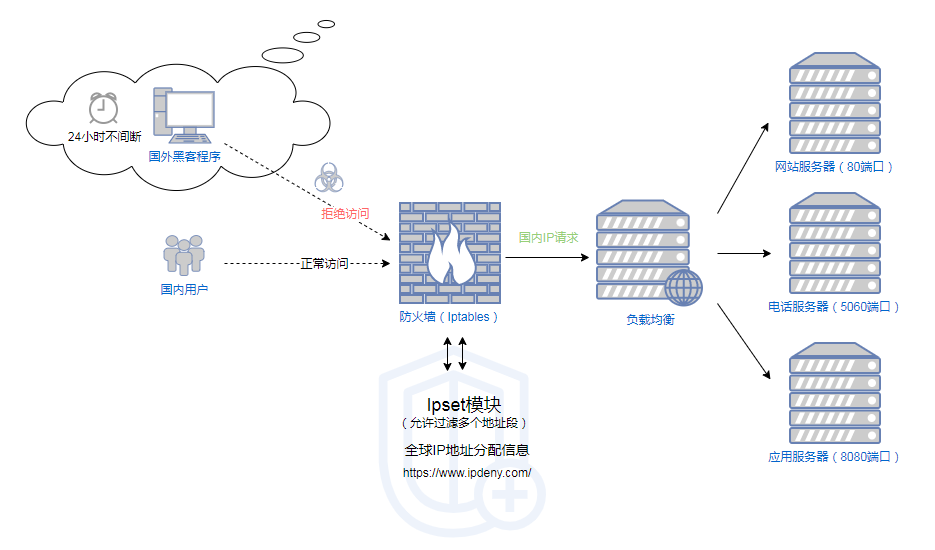
- 收集并整理国内IP地址段到Ipset中
- 配置Iptables调用Ipset模块检查来源IP
- 允许国内IP访问,拒绝国外IP连接
完整实施步骤
本指南基于CentOS 7.6环境,不同Linux版本的命令可能有所差异
安装必要工具
1
2
|
# 如果尚未安装ipset
yum install -y ipset
|
创建IP地址集合
下载中国IP地址段
1
|
wget http://www.ipdeny.com/ipblocks/data/countries/cn.zone
|
转换为Ipset指令
1
2
|
for i in `cat cn.zone`; do echo "ipset add china $i" >>ipset_result.sh; done
chmod +x ipset_result.sh
|
创建并填充Ipset集合
 1
 2
 3
 4
 5
 6
 7
 8
 9
10
|
# 创建china集合
ipset create china hash:net hashsize 10000 maxelem 1000000

# 添加局域网IP地址段
echo "ipset add china 10.0.0.0/8" >> ipset_result.sh
echo "ipset add china 172.0.0.0/8" >> ipset_result.sh
echo "ipset add china 192.0.0.0/8" >> ipset_result.sh

# 执行脚本添加IP段
bash ipset_result.sh
|
验证IP集合
1
2
|
ipset list china
ipset list china | wc -l  # 应有约8000多条数据
|
配置Iptables规则
 1
 2
 3
 4
 5
 6
 7
 8
 9
10
11
12
13
14
15
16
17
18
19
20
21
22
23
24
|
# 清除现有规则(如果需要)
iptables -F
iptables -X

# 创建基本规则
cat > /etc/sysconfig/iptables << EOF
*filter
:INPUT ACCEPT [0:0]
:FORWARD ACCEPT [0:0]
:OUTPUT ACCEPT [0:0]
-A INPUT -m state --state RELATED,ESTABLISHED -j ACCEPT
-A INPUT -p icmp -j ACCEPT
-A INPUT -i lo -j ACCEPT
-A INPUT -p tcp -m state --state NEW -m tcp --dport 22 -j ACCEPT
# 如需开放其他端口,请在此添加规则
# 例如: -A INPUT -p tcp -m state --state NEW -m tcp --dport 80 -j ACCEPT
-A INPUT -m set ! --match-set china src -j DROP
-A INPUT -j REJECT --reject-with icmp-host-prohibited
-A FORWARD -j REJECT --reject-with icmp-host-prohibited
COMMIT
EOF

# 应用规则
iptables-restore < /etc/sysconfig/iptables
|
确保配置持久化
为防止服务器重启后配置丢失,需要进行持久化设置:
持久化Ipset数据
1
2
3
4
5
6
|
# 保存Ipset数据
ipset save china > /etc/ipset.conf

# 配置启动时加载
chmod +x /etc/rc.d/rc.local
echo "ipset restore < /etc/ipset.conf" >> /etc/rc.d/rc.local
|
持久化Iptables规则
1
2
|
# 配置启动时加载
echo "/usr/sbin/iptables-restore < /etc/sysconfig/iptables" >> /etc/rc.d/rc.local
|
自动更新IP地址段
为确保IP地址段保持最新,可以设置定期更新:
 1
 2
 3
 4
 5
 6
 7
 8
 9
10
11
12
13
14
15
16
17
18
|
# 创建每周自动更新脚本
cat > /usr/local/bin/update_cn_ip.sh << EOF
#!/bin/bash
wget -O /tmp/cn.zone http://www.ipdeny.com/ipblocks/data/countries/cn.zone
ipset flush china
for ip in \$(cat /tmp/cn.zone); do ipset add china \$ip; done
# 添加局域网IP段
ipset add china 10.0.0.0/8
ipset add china 172.0.0.0/8
ipset add china 192.0.0.0/8
# 更新持久化文件
ipset save china > /etc/ipset.conf
EOF

chmod +x /usr/local/bin/update_cn_ip.sh

# 添加每周执行的定时任务
echo "0 0 * * 1 /usr/local/bin/update_cn_ip.sh" > /etc/cron.d/update_cn_ip
|
验证与故障排除
测试配置
1
2
3
4
5
6
7
8
|
# 检查Ipset集合
ipset list china

# 检查Iptables规则
iptables -L -n

# 测试国内IP访问(应该可以访问)
# 测试国外IP访问(应该被阻止)
|
常见问题解决
- 无法SSH连接:确保在添加拦截规则前先添加了SSH端口规则
- 局域网访问受限:检查是否添加了私有IP段到china集合
- 配置未持久化:检查rc.local文件权限和脚本内容
结论
通过屏蔽国外IP访问,我们可以大幅降低服务器被攻击的风险,特别适合主要面向国内用户的服务。需要注意的是,此方法可能会影响到海外用户的合法访问,请根据实际业务需求进行调整。