This article was published 446 days ago, some content may be outdated. If you have any questions, please leave a comment.
Why Block Foreign IP Addresses
Servers on public networks face severe security threats:
- Numerous scanners on the internet continuously probe servers 24/7, attempting to gain unauthorized access and control
- Server log analysis reveals that most attacks originate from foreign servers in countries like the Netherlands, United States, Singapore, and Japan
- Whether using cloud servers or IDC-hosted servers, exposing service ports increases vulnerability whenever public services are offered
Solution Overview
For services primarily targeting domestic users, blocking foreign IP access can significantly enhance security.
Technical Foundation
- Iptables: Linux firewall tool used to filter and block requests
- Ipset module: Iptables extension that efficiently handles large IP address ranges
- IPdeny: Provides regularly updated global IP address allocation data
Implementation Approach
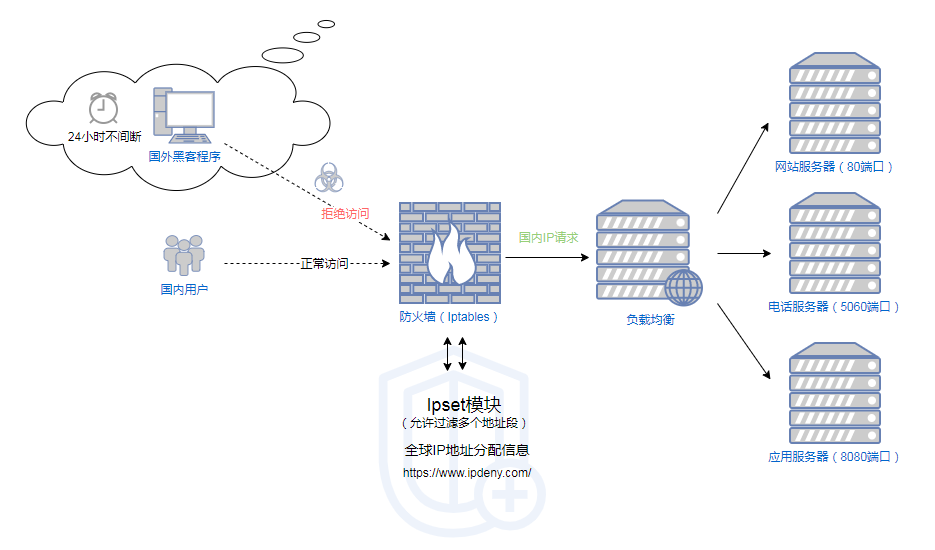
- Collect and organize domestic IP ranges into Ipset
- Configure Iptables to use Ipset for checking source IPs
- Allow domestic IP access while blocking foreign IP connections
Complete Implementation Steps
This guide is based on CentOS 7.6; commands may vary across different Linux distributions
1
2
|
# If ipset is not already installed
yum install -y ipset
|
Create IP Address Set
Download Domestic IP Ranges
1
|
wget http://www.ipdeny.com/ipblocks/data/countries/cn.zone
|
Convert to Ipset Commands
1
2
|
for i in `cat cn.zone`; do echo "ipset add china $i" >>ipset_result.sh; done
chmod +x ipset_result.sh
|
Create and Populate Ipset Collection
 1
 2
 3
 4
 5
 6
 7
 8
 9
10
|
# Create the china set
ipset create china hash:net hashsize 10000 maxelem 1000000

# Add private network IP ranges
echo "ipset add china 10.0.0.0/8" >> ipset_result.sh
echo "ipset add china 172.0.0.0/8" >> ipset_result.sh
echo "ipset add china 192.0.0.0/8" >> ipset_result.sh

# Execute script to add IP ranges
bash ipset_result.sh
|
Verify IP Collection
1
2
|
ipset list china
ipset list china | wc -l  # Should contain approximately 8000+ entries
|
 1
 2
 3
 4
 5
 6
 7
 8
 9
10
11
12
13
14
15
16
17
18
19
20
21
22
23
24
|
# Clear existing rules (if necessary)
iptables -F
iptables -X

# Create basic rules
cat > /etc/sysconfig/iptables << EOF
*filter
:INPUT ACCEPT [0:0]
:FORWARD ACCEPT [0:0]
:OUTPUT ACCEPT [0:0]
-A INPUT -m state --state RELATED,ESTABLISHED -j ACCEPT
-A INPUT -p icmp -j ACCEPT
-A INPUT -i lo -j ACCEPT
-A INPUT -p tcp -m state --state NEW -m tcp --dport 22 -j ACCEPT
# Add rules for other required ports below
# Example: -A INPUT -p tcp -m state --state NEW -m tcp --dport 80 -j ACCEPT
-A INPUT -m set ! --match-set china src -j DROP
-A INPUT -j REJECT --reject-with icmp-host-prohibited
-A FORWARD -j REJECT --reject-with icmp-host-prohibited
COMMIT
EOF

# Apply rules
iptables-restore < /etc/sysconfig/iptables
|
Ensure Configuration Persistence
To prevent configuration loss after server restart, set up persistence:
Persist Ipset Data
1
2
3
4
5
6
|
# Save Ipset data
ipset save china > /etc/ipset.conf

# Configure loading at startup
chmod +x /etc/rc.d/rc.local
echo "ipset restore < /etc/ipset.conf" >> /etc/rc.d/rc.local
|
Persist Iptables Rules
1
2
|
# Configure loading at startup
echo "/usr/sbin/iptables-restore < /etc/sysconfig/iptables" >> /etc/rc.d/rc.local
|
Automate IP Range Updates
To ensure IP ranges stay current, set up periodic updates:
 1
 2
 3
 4
 5
 6
 7
 8
 9
10
11
12
13
14
15
16
17
18
|
# Create weekly update script
cat > /usr/local/bin/update_cn_ip.sh << EOF
#!/bin/bash
wget -O /tmp/cn.zone http://www.ipdeny.com/ipblocks/data/countries/cn.zone
ipset flush china
for ip in \$(cat /tmp/cn.zone); do ipset add china \$ip; done
# Add private network IP ranges
ipset add china 10.0.0.0/8
ipset add china 172.0.0.0/8
ipset add china 192.0.0.0/8
# Update persistence file
ipset save china > /etc/ipset.conf
EOF

chmod +x /usr/local/bin/update_cn_ip.sh

# Add weekly scheduled task
echo "0 0 * * 1 /usr/local/bin/update_cn_ip.sh" > /etc/cron.d/update_cn_ip
|
Verification and Troubleshooting
Testing Configuration
1
2
3
4
5
6
7
8
|
# Check Ipset collection
ipset list china

# Check Iptables rules
iptables -L -n

# Test domestic IP access (should be allowed)
# Test foreign IP access (should be blocked)
|
Common Issues and Solutions
- Unable to SSH connect: Ensure SSH port rules are added before blocking rules
- Local network access restricted: Verify private IP ranges are added to the china set
- Configuration not persisting: Check rc.local file permissions and script content
Conclusion
By blocking foreign IP access, we can significantly reduce the risk of server attacks, particularly suitable for services primarily targeting domestic users. Note that this method may affect legitimate access from overseas users - adjust according to your specific business requirements.